
| 일 | 월 | 화 | 수 | 목 | 금 | 토 |
|---|---|---|---|---|---|---|
| 1 | 2 | 3 | ||||
| 4 | 5 | 6 | 7 | 8 | 9 | 10 |
| 11 | 12 | 13 | 14 | 15 | 16 | 17 |
| 18 | 19 | 20 | 21 | 22 | 23 | 24 |
| 25 | 26 | 27 | 28 | 29 | 30 | 31 |
- 청년내일채움공제
- 합격률15.18%
- 만기오긴오냐
- 정신력승리
- 자동화구현만세
- 화이팅
- 나름신중하게할거다하고있음
- 청년내일채움공제 끝
- 해내자
- 저것도꾸준히읽어야지ㅠㅠ
- 몸이고되고머리가힘들다
- 무탈히가길
- 이놈의기사또해내야돼
- 정신력승리함
- 너무어려워...
- 어렵다
- aws책은읽다말았는데
- 테라폼만세
- 청내공
- 청내공만기오긴오냐
- 윽짜증
- 청내공해내자
- IaC코드자동화
- Provider AWS
- 존버존버
- 해낼수있어
- 청내공화이팅
- 청내공만기
- 은우쌤
- 2025년 1회차
- Today
- Total
시나브로
Terraform 구성 본문
AWS 시작한지 1년후부터 IaC에 관심이 있었는데
오늘에서야 Terraform 코드를 적용하게 되었다
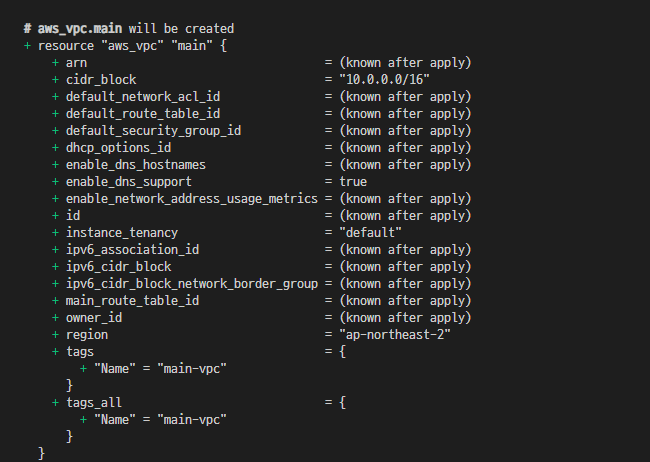
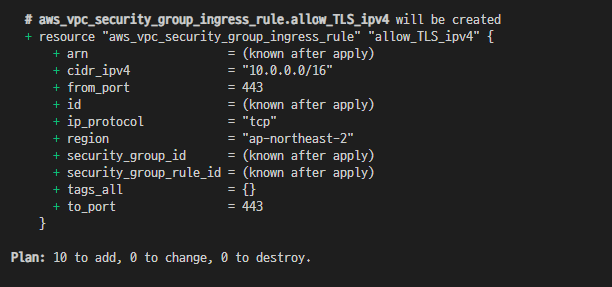
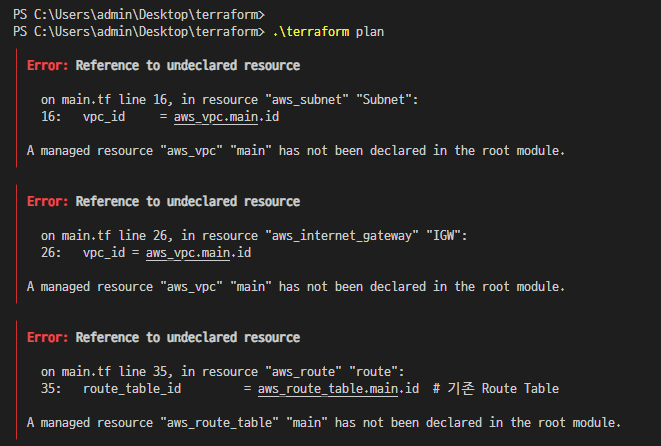
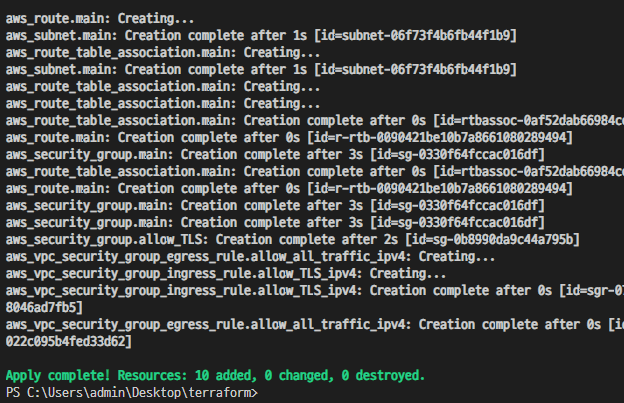
로컬에 설치하고 아주 기본 리소스인 VPC, Subnet, IGW 등 VSCode에 plan 및 apply해봤다
VScode에 테라폼 설치하는것도 어떻게 보면 쉬운 일인데 난 어렵게만 생각해서 헤맸다

provider "aws" {
region = "ap-northeast-2"
}
# VPC
resource "aws_vpc" "main" {
cidr_block = "10.0.0.0/16"
tags = {
Name = "main-vpc"
}
}
# Subnet
resource "aws_subnet" "main" {
vpc_id = aws_vpc.main.id
cidr_block = "10.0.10.0/24"
tags = {
Name = "main-subnet"
}
}
# IGW
resource "aws_internet_gateway" "main" {
vpc_id = aws_vpc.main.id
tags = {
Name = "main-igw"
}
}
# Route (예: 0.0.0.0/0 → IGW)
resource "aws_route" "main" {
route_table_id = aws_route_table.main.id # 기존 Route Table
destination_cidr_block = "0.0.0.0/0"
gateway_id = aws_internet_gateway.main.id # 기존 IGW
}
# Route Table
resource "aws_route_table" "main" {
vpc_id = aws_vpc.main.id
tags = {
Name = "main-route_table"
}
}
# Route Table Association (Subnet에 Route Table 연결)
resource "aws_route_table_association" "main" {
subnet_id = aws_subnet.main.id # 기존 Subnet
route_table_id = aws_route_table.main.id
}
/*
resource "aws_route_table_association" "a" {
subnet_id = aws_subnet.foo.id
route_table_id = aws_route_table.bar.id
}
resource "aws_route_table_association" "b" {
gateway_id = aws_internet_gateway.foo.id
route_table_id = aws_route_table.bar.id
}
*/
# 보안그룹
resource "aws_security_group" "allow_TLS" {
name = "allow_TLS"
description = "Allow TLS inbound traffic and all outbound traffic"
vpc_id = aws_vpc.main.id
tags = {
Name = "allow_TLS"
}
}
resource "aws_vpc_security_group_ingress_rule" "allow_TLS_ipv4" {
security_group_id = aws_security_group.allow_TLS.id
cidr_ipv4 = aws_vpc.main.cidr_block
from_port = 443
ip_protocol = "tcp"
to_port = 443
}
resource "aws_vpc_security_group_egress_rule" "allow_all_traffic_ipv4" {
security_group_id = aws_security_group.allow_TLS.id
cidr_ipv4 = "0.0.0.0/0"
ip_protocol = "-1" # semantically equivalent to all ports
}
# SSH
resource "aws_security_group" "main" {
name = "ssh-security-group"
description = "Allow SSH access"
vpc_id = "vpc-xxxxxxxx" # 사용할 vpc id
ingress {
description = "SSH from anywhere"
from_port = 22
to_port = 22
protocol = "tcp"
cidr_blocks = ["My IP"] # 보안상 제한 가능
}
egress {
from_port = 0
to_port = 0
protocol = "-1" # 모든 아웃바운드 허용
cidr_blocks = ["0.0.0.0/0"]
}
tags = {
Name = "ssh-sg"
}
}
생각보다 수월했다
네트워크만 해봤고, 이제 인스턴스 구성도 해봐야겠다
AWS 콘솔 확인





이 3가지가 좀 헷갈리다...
Route Table → 규칙 모음이에요. 어떤 네트워크 대역을 어디로 보내야 하는지 목록으로 가지고 있음.
Route → 그 규칙 하나 하나를 의미. 예: "10.0.1.0/22 → 인터넷 게이트웨이"
Route Table Association → 그 Route Table을 어떤 Subnet이나 Gateway에 적용할지 연결

💡 한 줄 요약:
Route = 규칙 하나, Route Table = 규칙 모음, Association = 적용 대상 연결
내 연구를 도와준 링크 !!
https://brunch.co.kr/@topasvga/5007
https://kukim.tistory.com/154
https://registry.terraform.io/providers/hashicorp/aws/latest/docs